

Selling online isn’t restricted to retailers. Wholesale businesses also have their own websites from where they conduct operations. People who are looking to place bulk orders can go to the wholesale business’s website and leave a quotation. Then the site owner responds and that’s how discussions ensue.
A wholesale e-Commerce website differs from a retail website in certain ways, the main difference being in the order quantity and pricing. Wholesale websites are typically B2B, whereas retail sites are B2C.
Features of a Wholesale Business Website

Pricing Structure
Wholesale sites have different price structures for different customers. You have the option of offering group discounts, quantity-based costing, dynamic pricing for certain products for specified customers, etc. A wholesale store scenario is dynamic, and hence, the pricing cannot be the same for every customer.
Regulated Checkout Procedure
Wholesale websites do not allow every single order to be checked out. There are certain conditions such as the credit history of the customer, the geographical location of the customer, a tie-up with a courier company, etc. These rules differ from site to site, but not drastically.
Navigation and Search
These are just as important for a B2B sales site as for a B2C. Wholesale sites must have a search option for users to type in what they are looking for. Similarly, they must be able to navigate easily through a large product base and get to their search query. Some wholesale websites have filters for navigation based on specifications such as category, size, color, price, etc.
Responsiveness
Wholesale business websites are responsive across many devices like mobiles, tablets, and iPads. As a site owner, you should analyze what devices your customers generally use and make the website responsive accordingly.
Quick Order
For customers who know exactly what they want right down to the product number, dimensions, and quantity, wholesale business websites have a ‘Quick Order’ form. The customer enters the details into the form, adds it to the cart, and checks out.
Sales Agent Support
Wholesale websites can collaborate with sales reps and have them cater to the customers. The rep can build a relationship with customers and carry out product ordering for them. He also helps with marketing the website. This proves beneficial for both the rep and the site.
Setting Up a Wholesale Business Website on WordPress
If you want to set up your eCommerce wholesale website on WordPress, then WooCommerce is the best plugin to use. Although it is commonly used for retail websites, if used in accompaniment with a few other plugins, WooCommerce can be an effective medium for your wholesale business website as well. You can also check our list of top 5 WooCommerce wholesale plugins here.
Before getting to the other plugins, let’s take a look at the benefits of using WooCommerce.
- It’s free
- It offers immense flexibility in categorizing products on the website
- Extremely easy to learn and use for newcomers
- Readily available tutorials all over the web
- A very versatile plugin, it can integrate an e-Store, website, and blog in one place
- Offers a lot of scope for customization of website appearance
- Covers analytics tools
- Has hundreds of extensions to choose from
- Looks extremely professional
All these pros make WooCommerce the best e-Commerce plugin for WordPress. Now let’s move on to the WooCommerce extensions needed to create a wholesale business website.
WooCommerce Extensions for Wholesale Business Websites
Application and Enquiry Forms

Forms are an essential mode of communication between the seller and prospective buyer. Emails and ‘Contact Us’ forms prove to be ineffective. An application form compiles all the details of the buyer when they approach you for the first time.
As for inquiries, many buyers are shopping around for information before finalizing on a vendor. Wholesale inquiries are generally unique, unlike retail consumer products. A proper product inquiry system streamlines the process, making it easier for the seller to respond to queries on time. You can use the following plugins for this purpose –
- Ninja Forms
- Gravity Forms
- Product Enquiry Pro
- Caldera Forms
Advanced Pricing Features

Advanced pricing means applying rules related to the final price of goods for different wholesalers. You can set these rules based on customer groups, specific products, amount purchased, or a combination of these.
For example, you may give a discount to a particular customer, or on the purchase of bulk merchandise. It depends on you. The plugins that you can use for this purpose are –
- WooCommerce Dynamic Pricing
- Customer Specific Pricing for WooCommerce
- Dynamic Pricing and Discounts for WooCommerce
Create Private Store
Only sell to pre-approved wholesale customers by making your entire WooCommerce wholesale store private. You can totally hide your store, and then require a login or password for customers to continue. Keeping your wholesale pricing totally private, and invisible from your public-facing website, makes this a smart choice. The plugins you’ll need for this purpose are –
- WooCommerce Private Store (for hiding your whole store)
- WooCommerce Password Protected Categories (for hiding individual categories)
Assigning User Roles

Assigning user roles to customers sets the base for pricing. If you have different levels or categories of customers eligible for different pricing categories, then you must assign each of them a user role. You can always add, remove and manage user roles. It is completely in your control. The plugins you need for this purpose are –
Product Labels

If you sell both retail and wholesale products, then you must consider using product labels for labeling items as ‘wholesale’ and ‘retail’. Adding a label that says ‘wholesale’ will drive those customers to the products. You can add product labels using the WooCommerce Advanced Product Labels plugin.
Purchase Order

When your customers are at the checkout page, they can pay either after delivery, in installments, or via a purchase order. A PO number is provided by you to the customer at the time of making the agreement, which he enters at the time of checkout. WooCommerce offers the Purchase Order plugin for generating a PO for the customer at the payment gateway.
The All-in-One Alternative: B2BKing
The extensions above each solve one piece of the wholesale puzzle, and you can absolutely build a capable wholesale store by combining them. But stitching together separate plugins for pricing, registration, private access, and purchase orders means more licenses to manage, more potential conflicts, and more moving parts to keep updated.
If you’d rather handle all of it from a single, purpose-built solution, B2BKing is worth a look.
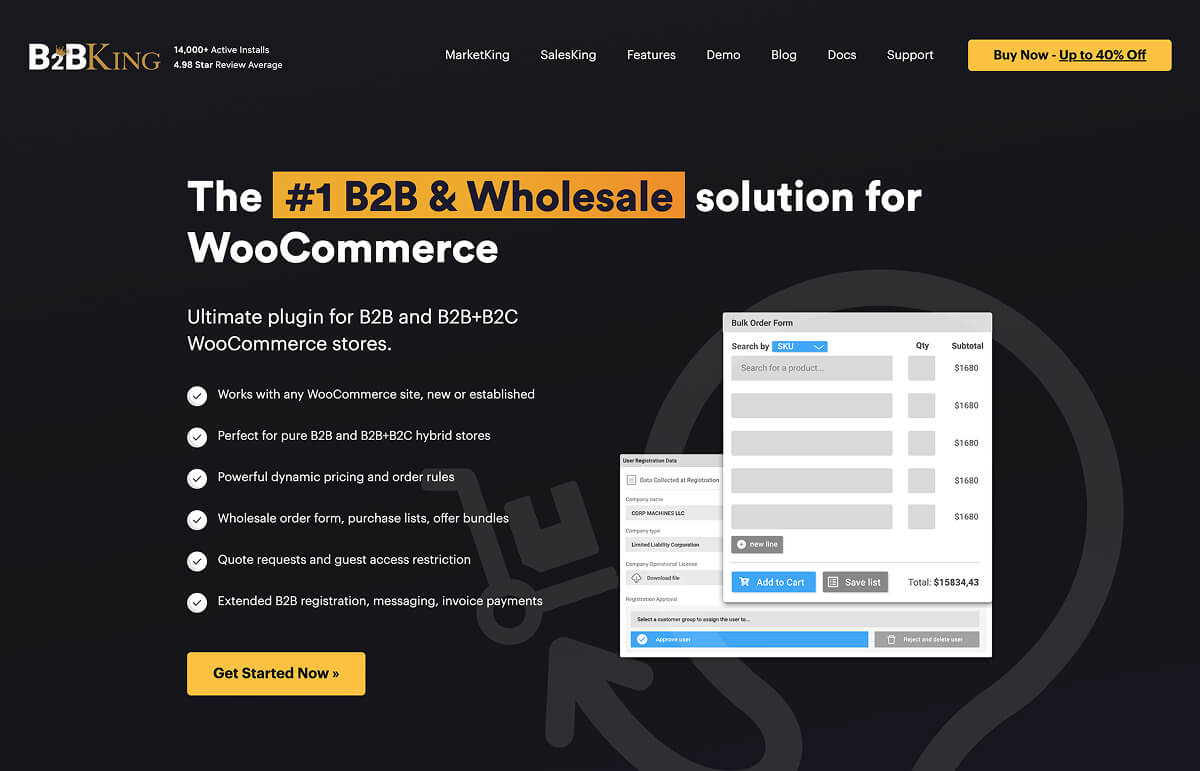
It’s a complete WooCommerce B2B and wholesale plugin that covers most of what this article describes in one place:
- Advanced pricing: group-based wholesale pricing, tiered quantity discounts, and per-customer price lists, replacing the need for a separate dynamic pricing plugin.
- User roles and registration :separate B2B and B2C registration forms with custom fields (such as VAT or tax IDs) and manual approval, so only vetted wholesale customers get access.
- Private store and hidden prices: hide prices from guests or restrict your store to logged-in, approved buyers, much like a dedicated private store plugin.
- Quick ordering: a built-in wholesale order form that lets buyers add many products and quantities to the cart at once.
- Quotes and purchase orders: let customers request quotes and negotiate, and pay via invoice or purchase order with the built-in invoice payment gateway.
With over 137 features in total, B2BKing runs as either a B2B-only store or a hybrid B2B and B2C store from the same WooCommerce install. There’s a free version to test the core functionality, with paid plans starting at $179 per year. For a deeper look, see our full guide to building a B2B and wholesale store with B2BKing.
In Conclusion
When creating a wholesale business website on WooCommerce, you can opt for obtaining WooCommerce services such as store development, customization, managing extensions, etc. from a reputed company if you are relatively new to it. This also includes long-term assistance with managing the store.
WooCommerce is a good option for creating a wholesale business online because it is easy to use, all-inclusive, and free! It is by far the best e-Commerce plugin offered by WordPress.



3 Responses
Ciao, sto sviluppando un sito B2B tra grossisti e distributori. Come posso inserire un “limite” di ordine determinato dal budget? Cioè, vorrei che ogni cliente possa ordinare fino a una soglia di tot euro, ad es. 2000€. Esiste qualche plugin in merito? Grazie
Hi William,
it’s possible! Take a look to this plugin, it seems to be right for you:
I hope it helps you!
is it possibile to have b2c and b2b on the same site and for the same product? in other words same products but different prices, purchase process and gui (b2b –> table; b2c standard woocommerce visual)?