


Web hosting is a vital part of your WordPress site. It lays a great stake on whether your site will ensure success or fail in the long run. So when developing your website from the ground up, you need to choose the best web hosting for the type of site you are building. This article will not only explain the value of web hosting to you but also help you choose the best web hosting type and vendor for your WordPress website.
At the core of every successful WordPress site are the foundations that keep it together. Web hosting happens to be one of them.
It is easy to dismiss the importance of web hosting as you can just pluck your way at random from hundreds of choices. While your primary goal is to put up your site, it is even more critical that you set up your WordPress website on solid ground.
This reason is precisely why you need to understand how your web hosting of choice will pave the way to your site’s success.
How important is web hosting to your site?
Web hosting is responsible for keeping your site live. The term uptime refers to the percentage that the web hosting guarantees your site to be online and available for viewing.
Most web hosting can assure 99.9% uptime, which means that your site will only experience downtime for 43 minutes every month. Some of the better-performing web hosting services can offer as high as 99.9999% uptime or only three seconds of downtime every month.
Aside from being a repository for your WordPress CMS and other files, your web hosting determines your site speed. While there are on-site factors that play a role in your site’s loading speed, you can work through them systematically to improve site performance. What you can’t control is the server stress of your web hosting.
Once your WordPress site generates a massive flow of traffic, your web hosting will be the one responsible for processing user requests from loading your site on their browsers. If your traffic is too much for your web hosting server to handle, then your site will take a long time to load.
Worse, your site can break and go offline until further notice.
You don’t want this to happen because going offline may cause your visitors to move to your competitors. Therefore, you need to choose the right hosting for the benefit of your business.
Types of web hosting
There are five main types of web hosting that you need to be aware of, plus one important dimension worth thinking about on top.
Shared Hosting
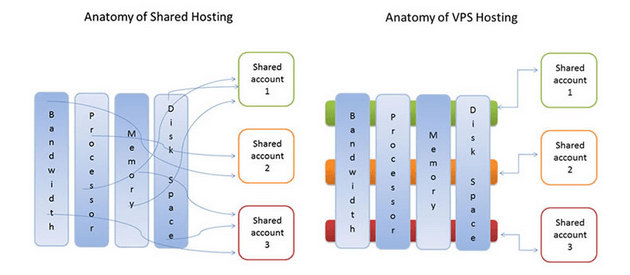
This hosting type is the most affordable solution because you share the server with other websites. Therefore, when a site on the server drives lots of traffic the performance of your site suffers. For shared hosting, SiteGround and NameHero are both solid picks.
NameHero in particular runs on LiteSpeed, which gives WordPress sites a real speed advantage over the Apache and Nginx setups that are common at this tier. Bluehost is another long-running option if you want something more entry-level.
VPS Hosting
If you want your site to enjoy the benefits of a dedicated server at reduced costs, VPS hosting is your choice. This hosting is located within shared hosting, so it’s still a step down compared to other premium hosting services. However, the advantage it holds over shared hosting is it prevents hosting neighbors from affecting the performance of your sites.
For VPS WordPress hosting, Liquid Web is a strong pick, especially for sites that need predictable resource allocation without managing the underlying server themselves.
Cloud-based Hosting
Instead of relying on a single server, cloud-based hosting distributes your site across multiple servers, so resources can scale up and down with demand. That makes cloud hosting better at handling traffic spikes and less likely to go down because of one underlying server failure.
A cloud-based WordPress host to consider is Cloudways. It’s one of the better-known options if you want a managed experience layered on top of a cloud provider like DigitalOcean or Vultr.
Dedicated Hosting
All the server resources are at your disposal. Since you don’t share the server with anyone else, you can expect strong, predictable performance. The trade-off is cost. On top of the higher monthly hosting fee, you may also need to budget for a system administrator to keep things running properly.
Both Liquid Web and WP Engine offer dedicated WordPress options for sites that have outgrown shared environments.
Managed WordPress Hosting
If you want to focus on running your website and leave the infrastructure side to someone else, managed WordPress hosting handles WordPress installation, security hardening, automated updates, caching, and scaling for you.
Most managed hosts also include staging environments and one-click cloning to make safe deployments easier. Kinsta, WP Engine, and Liquid Web are three of the better-known names in this space.
Privacy-Focused Hosting
Most hosting choices come down to price, performance, and features. There’s another dimension worth thinking about for some site owners though, which is where your data lives and how much of yours the host gets to keep.
If you operate under GDPR, serve EU customers, or just want to avoid US-based data centers, privacy-focused WordPress hosting from a host like Packetra is worth considering. Packetra runs WordPress hosting out of Finland and Switzerland, lets you sign up with just an email, and supports crypto payments alongside more conventional options like PayPal and Wise.
What kind of site do you run?
The hosting you want to run depends on the type of site you run. Not all sites are built the same, which is why each attracts varying amounts of traffic.
Below are the most common types of sites you can run on WordPress and the most appropriate hosting you should use.
Portfolio/branding site
You created a site where you can showcase your sample works for potential clients to see. Assuming that you have no content strategy, you are more likely not to attract a lot of traffic to your site. Therefore, you can go with the most affordable solution which is shared hosting.
Blog
You are publishing content on a regular basis to build a readership and generate lots of traffic. In this case, you may want a more long-term solution if you expect your traffic to grow exponentially. Subscribing to a cloud-based hosting from the very start, while more expensive, will help your site withstand an onslaught of traffic once the time comes.
Business site
You are using your site as a platform to sell your products or services. You are releasing different content types to attract your audience in hopes of converting them into customers. With such a technical approach to marketing your business online, you need to go with at least a virtual private server so you can have all the resources you need to keep your site online as much as possible.
eCommerce Site
You have set up an online shop so you can sell your items. A successful eCommerce site can attract millions of traffic, so you want the best of the best. As mentioned earlier, going offline because your server crashed due to massive traffic is bad for business. Therefore, managed WooCommerce hosting ensures that your e-store will run in tip-top shape no matter what happens.
What’s the best hosting for you?
The kind of WordPress site you are running will dictate which type of web hosting you need.
However, another problem is choosing which web hosting service provider to go with. Multiple providers are equally good in their right and some provide nearly identical services to the naked eye.
Review the list of shared hosting or pick one of these WordPress hosting services before selecting a host. Refer to the reviews to give you a better idea of each web hosting company’s distinct features.
More importantly, you need to keep testing and measuring how your web hosting actually performs. A proper WordPress performance audit tells you exactly where the bottlenecks are before you start changing things.
Free tools like Google PageSpeed Insights and GTmetrix give you a quicker sense of how your site is performing in the real world. If you’re not happy with what you see, or you think the site could be running faster, don’t be afraid to switch providers. All-in-One WP Migration is one of the simpler ways to move a site between hosts without breaking things.
As a website owner, it’s imperative to ensure that your site is user-friendly and accessible to your intended audience. You have to consider the needs and preferences of your target visitors so that you can attain your desired level of success for your WordPress site. Whether it is through the speed and efficiency of your web hosting or the additional features that you offer, your primary goal should always be to provide a positive experience for your users.
Choosing the right hosting comes down to matching the type and the provider to what your site actually needs. If you’d like a deeper look at specific hosts before committing, our WordPress hosting reviews cover most of the names mentioned above in detail.




One Response
Great Article Christopher.
I loved how you compared different types of hosting.
Levi