
If you’ve heard of or make use of e-commerce with WordPress in any way you must have come across Easy Digital Downloads at one point or another. It’s the best (and free) plugin to sell digital downloads on your WordPress site in an easy and organised way.

Besides the basic plugin that you can download for free from the WordPress plugin repository, there are also a number of premium extensions you can purchase from the EDD website. One of the latest extensions to be released is a project undertaken by our own team; Add to Cart Popup.
Many customers might want to purchase more than one item or download at a time, so sending them directly to their Cart upon clicking the “Purchase” button isn’t the ideal way to do things.
This could take their mind off their second purchase (or third, or more) and hence lose you further sales. You always want to strive towards making as many sales as possible within a single customer purchase, and one great way of doing this is to ask the customer whether they want to proceed to checkout or continue shopping upon clicking on that wonderful “Purchase” button.
That’s where the Add to Cart Popup does its magic. Once installed on your website it will appear under the EDD Extensions settings where you can modify the colours to match your website’s colour scheme, change the text within the popup depending on your client base, and even change the text used for the buttons.
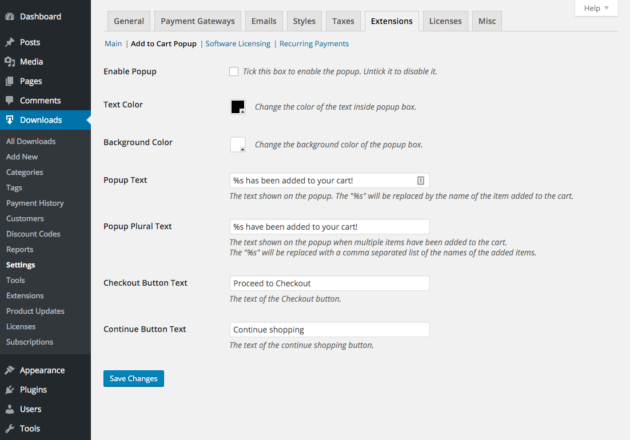
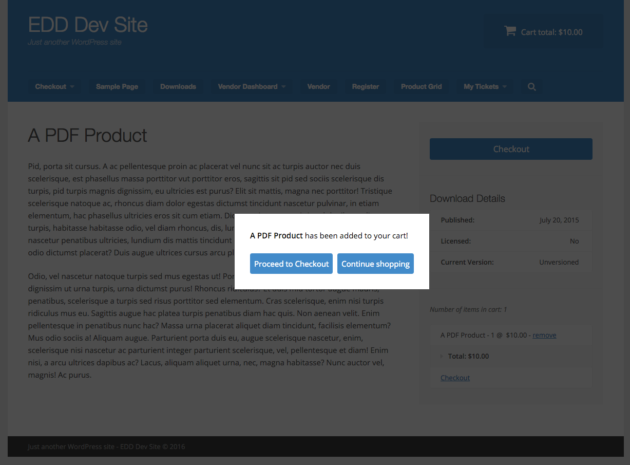
Once all that is ready you simply need to enable the popup, save the settings and voila! From now on every time a customer clicks on the “Purchase” button on your website they will be presented with a popup such as the one below.
Seeing as it’s so easy to purchase things online nowadays it will be far more tempting to continue shopping when provided with this option, once again increasing your chances of making bigger sales.
When you consider the possible increase in revenue that such a simple tool can make it’s even more pleasing to note that this extension only costs $19 for a single-site license! You can easily make up that amount with one purchase and keep making bigger profits from then on.
Create the perfect bridge between the product page and checkout with Add to Cart Popup!